WHAT IS WEB DESIGN?
WHAT IS WEB DESIGN?
In this article, we will answer the question What is Web Design?; Web design refers to the design of websites displayed on the internet. It generally refers to the user experience of website development rather than software development.
Web design focused on designing websites for desktop browsers; However, since mid-2010, design for mobile and tablet browsers has become more and more important.
A web designer works on the look, layout, and in some cases, the content of a website. For example, it has to do with appearance, colors, font and images used. The layout shows how the information is structured and categorized. A good web design is easy to use, aesthetically pleasing, and fits the website’s user group and brand.
Many web pages are designed with a focus on simplicity so that no extraneous information or functionality is revealed to distract or confuse users. Since the cornerstone of a web designer’s output is a site that gains and encourages the target audience’s trust, it is critical to eliminate the frustration of as many potential users as possible.
What is Web Design?
Two of the most common methods for designing websites that work well on both desktop and mobile devices are responsive and adaptive design. In responsive design, content moves dynamically based on screen size; In adaptive design, website content is fixed in layout sizes that match overall screen sizes. Maintaining as consistent a layout as possible across devices is critical to building user trust and engagement.
As responsive design can present challenges, designers should be careful not to give up control of how their work will look. If they are also responsible for the content, they will have the advantage of full control of the finished product, while they may need to expand their skill set.
Parallax Web Design – The World May Not Move For Us, But The Web Can
Parallax web design, unlike some information online, has been around for a while. In fact, it was first found in computer games in the early 1980s. The Jump Bug, 1981 title had parallax design elements, and both Moon Patrol and Jump Bug had 1982 full parallax design implementations.
parallax-web-design
Parallax design is becoming more and more popular in website applications today, and it’s a nice tool to have in your design toolkit.
Although the author of Composite Persuasion is not forgotten as Joel Marsh; “Expert users can’t make much decisions based on aesthetics. Look and feel creates attraction and not loyalty. ”
What is Parallax Web Design?
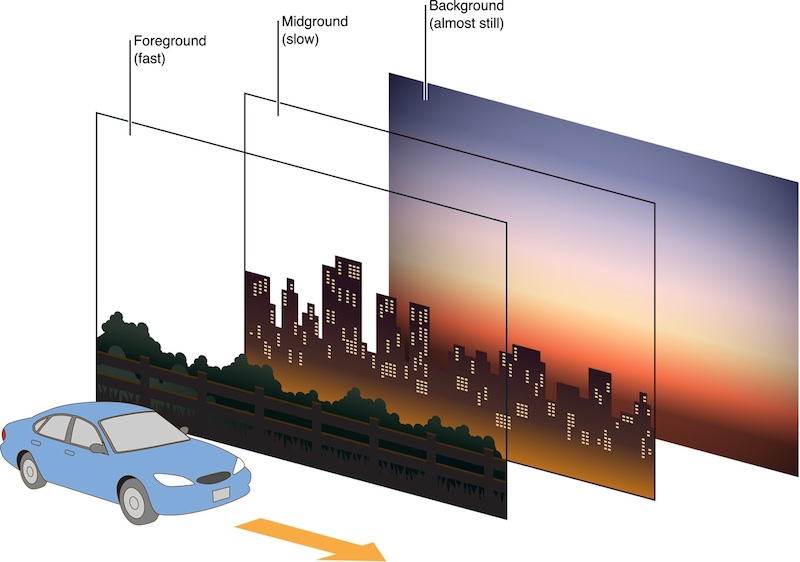
Parallax design is a simple technique in which the background image in the camera moves slower than the foreground image. This has two effects on your web designs; first, it gives 2D pages a sense of depth, and second, relative motion can help the page catch the eye.
Why Did You Apply Parallax Design?
Proponents of the parallax design say it helps:
- Impress viewers with both the depth of the page and the animated approach.
- Enhance storytelling with your design
- Makes it easier to direct visitors to your site by providing a natural flow to a web page
- Arouse the reader’s curiosity
- Signs are calls to action and increase the likelihood of getting clicks
- Strengthen the credibility of a site by making it feel more interactive
HOW TO ACHIEVE PARALLAX IN WEB DESIGN
There are four main methods for applying parallax designs in general. Some are better suited to the internet than others.
Method 1 – Layered Parallax Design

parallax-design
This parallax design relies on the display system to support the use of multiple background layers that can then be scrolled at independent rates. This scrolling can normally be done horizontally or vertically.
Parallax is achieved by instructing each layer to change its position in a certain direction by a certain but different amount for each layer.
Method 2 – Sprite method for parallax design
TheSprite method works by taking combinations of images and merging them with pseudo layers for “sprites”. Moving the “camera” angle for later viewing gives visibility to a single layer or group of layers making the others invisible. This method also creates a stunning 3-D effect on images that would otherwise be flat.
Method 3 – Repetition pattern animation for parallax design
This method uses a scrolling screen of floating tiles that layer over a repeating background layer. Individual bitmaps for each tile are animated to give the illusion of parallax effect. A popular technique for this is color cycling, which quickly animates all tiles on the screen.
Method 4 – Raster Method for Parallax Design
This method requires you to draw a separate pixel line and then refresh it all the way down the screen (top to bottom), leaving a slight delay between each drawn line to create a parallax effect.
PARALLAX EVALUATION IN WEB DESIGN
The use of parallax in web design can be great in expert hands, but it also has some disadvantages. Implementing such a design with Parallax also has disadvantages:
If done poorly, it is not valuable but can be dangerous to the user
It can affect the way SEO is implemented as meta information makes it difficult to diversify, limiting you to a single H1 tag and a single URL
Too many images and if information is used, care must be taken with web design otherwise you will have very poor page load times and too many visitors will go elsewhere with the associated costs and disadvantages of the method)
Reduces internal linking within the site
TIPS IN PARALLAX WEB DESIGN
Tips for Successfully Applying Parallax Design to Your Website
There are a few simple tips that can improve the UX of parallax designs on websites, including:
Try to keep things relatively simple. Overly complex parallax designs can confuse the user and make it difficult to separate content from design.
Try to use parallax design to tell a story. Stories are automatically more interesting to users, and parallax can really enhance that.
Try to keep things fun. Be sure to experiment and enhance the depth of the page when using the parallax design.
Try to use it to highlight calls to action. This will not only improve the user experience, but should also bring better business results.
Remember to try the design across multiple browsers and mobile – parallax designs are often very fragile when used on these platforms.
WEB DESIGN & PSYCHOLOGY
One of the key components of a successful product is the creation of effective, efficient and visually pleasing displays. To produce such high-quality displays, an understanding of human vision along with visual perception information, whether graphical (web sites) or tangible (e.g. remote controls), is required.
By observing, researching and describing examples of our perceptual abilities, we can design products according to these unifying qualities. To extend these capabilities to the world of interaction design, we developed Psychology and Web Design: The Ultimate Guide.
Web Design Psychology
The psychology of human thought, action and perceptionIt is a theory of mind applied to aspects of In particular, Gestalt theorists and researchers seek to understand visual perception in terms of how underlying processes are organized and how they help us understand the world.
The organization of these cognitive processes is important to an understanding of how we continually interpret the flow of visual information that enters our eyes and how it makes the world a coherent, meaningful and useful representation. Over the past two decades, the work of Gestalt psychologists has been embraced by interaction designers and other professionals involved in the development of products for human users.As part of this course, we’ve compiled and combined some of the best resources currently available on Gestalt psychology and visual perception. To help you appreciate how you can apply Gestalt psychology to web design, we’ve included many different examples of existing designs.
These draw attention to the peculiarities, quirks, and features of visual perception. Furthermore, they discuss how they are deployed and, in some cases, how they are used to support the user’s intentions or the designer’s or client’s intentions.
The application of Gestalt thinking to design gives us insights and new ways of approaching problems and challenges. By putting our own minds on the ways we organize visual information, we can improve our designs for all users.
MOBILE COMPATIBLE AND RESPONSIBLE WEB DESIGN
Internet sites are the basis of the promotion, communication, communication and trade network of our age, and it is obvious that the power of social media has come.

COMPATIBLE AND RESPONSIVE WEB DESIGN
Corporate companies that follow useful technologies invest in certain budgets with the aim of benefiting from software technologies at a high level. They aim to get the maximum return on the capital they have raised. So, is the service they purchased really professional? Or is it just an investment consisting of a simple website they publish online?
Many companies manage to stay ahead of countless companies both locally and internationally in mutual interest, and here is where professionalism shows itself again.
WHY IS A RESPONSIBLE AND ADAPTABLE WEB DESIGN NEEDED?
There is some confusion over the difference between responsive design and adaptive design. The boundaries may seem blurry to those without experience with either design style, but there are clear differences when you take a closer look at the two.

What is Web Design?
Responsive Design was first coined by web designer and developer Ethan Marcotte in his book Responsive Web Design. Responsive designs respond to changes in browser width by adjusting the placement of design elements to fit the available space.A responsive website displays content based on available browser space. If you open a responsive site on the desktop and then change the size of the browser window, the content will (at least in theory) move dynamically to self-arrange in the best way for the browser window. On mobile phones, this process is automatic; the site checks the available space and then reveals itself with the ideal arrangement.
Responsive design is simple. Because it’s streamlined, it means users can access your online world and enjoy it on their handheld devices like they would on a large monitor. For this to be true, responsive design requires a very good conceptualization of the site and an in-depth knowledge of end users’ needs and desires!
You can trust Limon Teknoloji team, who are experts in web design solutions!
If you want to learn more about how we can support you in the field of professional web design, do not hesitate to contact us. We can visit you or host you in our office and carry out a highly productive work together.